
Software evaluation
Integrated Risk Management Software Evaluation Checklist
A buyer-focused checklist for evaluating integrated risk management software with representative journeys and complete cost.
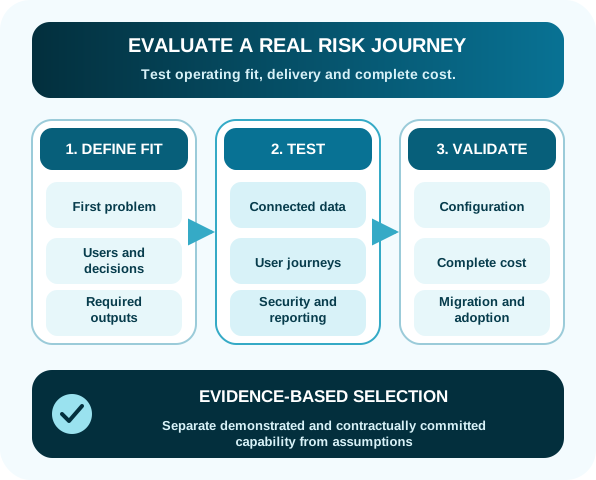
An integrated risk management software evaluation should test whether a platform can support real decisions across teams. Generic feature scores tend to reward the longest list rather than the best fit.
Use representative risk journeys, controlled evidence and a complete commercial model. Keep requirements tied to outcomes that stakeholders can recognize.
Use a scorecard that records evidence
Score only what the evaluation team can identify clearly. A confident presentation is not the same as demonstrated capability or a contractual commitment.
| Score | Meaning | Evidence to retain |
|---|---|---|
| 0 | Not addressed | No response or the vendor could not show the requirement |
| 1 | Stated | Vendor response only; demonstration or commitment still required |
| 2 | Demonstrated | Observed using the agreed scenario and representative role |
| 3 | Committed | Included in the proposed scope, commercial terms and acceptance criteria |
1. Define the first operating problem
Identify the register or workflow causing the most friction. Common starting points are enterprise risk or IT risk registers that cannot be consolidated reliably.
Document the users, decisions, source data, access rules, review cycle and required outputs for that first scope.
2. Test connected data
Ask the vendor to show how risks relate to objectives, services, controls, assessments, incidents, issues, suppliers and remediation.
Confirm whether common catalogs can be reused across domains without duplicating records.
3. Test representative users
Include a risk owner, contributor, reviewer, oversight analyst and executive viewer. Observe how many steps each needs for a normal task.
Determine whether occasional business users need a paid license, formal training or specialist assistance.
4. Validate security and identity
Use examples with different sensitivity levels. Confirm whether access can be controlled at the item level and whether permissions can use roles, groups and specific users.
Review identity provider support, single sign-on configuration, deployment options and the evidence needed for your security assessment.
5. Challenge reporting
Provide the vendor with the questions a committee or board asks. Require a demonstration that moves from a summary back to the relevant source records.
Test how category changes, late reviews, appetite exceptions and overdue actions appear.
6. Understand configuration and change
Ask who can change fields, taxonomies, workflows, notifications and reports after launch. Distinguish routine administration from product customization.
Review how changes are tested, approved and moved between environments.
7. Model complete cost
Capture license units, modules, users, tiers, implementation, migration, support, training, integrations, environments and expected expansion.
Use at least three scenarios: first register, normal adoption and enterprise expansion.
8. Plan migration and adoption
Inspect source registers early. Agree data mapping, cleansing, history, duplicates and reconciliation before confirming effort.
A platform should make the process intuitive, but adoption still requires clear ownership, definitions and leadership expectations.
9. Use evidence-based selection
Record what was demonstrated, what was stated, what is contractually committed and what remains an assumption. Do not turn roadmap statements into current capability scores.
Review the Parapet comparison framework and transparent pricing model as part of the evaluation.
Warning signs during evaluation
Pause when the proposed solution keeps changing as representative users join the demonstration. That often reveals a scope or packaging assumption that was invisible in the original response.
- A roadmap item is scored as if it exists today
- The executive report is a static mockup with no drill-down
- A business owner cannot complete a normal update without administrator help
- Implementation dates exclude data, identity or security work
- The quote omits users, modules or environments needed for the demonstrated journey
Run a 60-minute evidence session
- First 10 minutes:State the operating problem, roles, source data and decision the demonstration must support.
- Next 20 minutes:Let representative users complete the agreed journey without replacing it with a prepared vendor story.
- Next 15 minutes:Change one permission, taxonomy value or workflow rule and observe who can do it.
- Next 10 minutes:Trace the executive result back to its source records and evidence.
- Final 5 minutes:Record what was observed, merely stated, contractually committed or still assumed.
This exercise turns a long checklist into observable evidence and exposes implementation or licensing assumptions while the vendor is still present.